Last Updated: 30 September, 2026
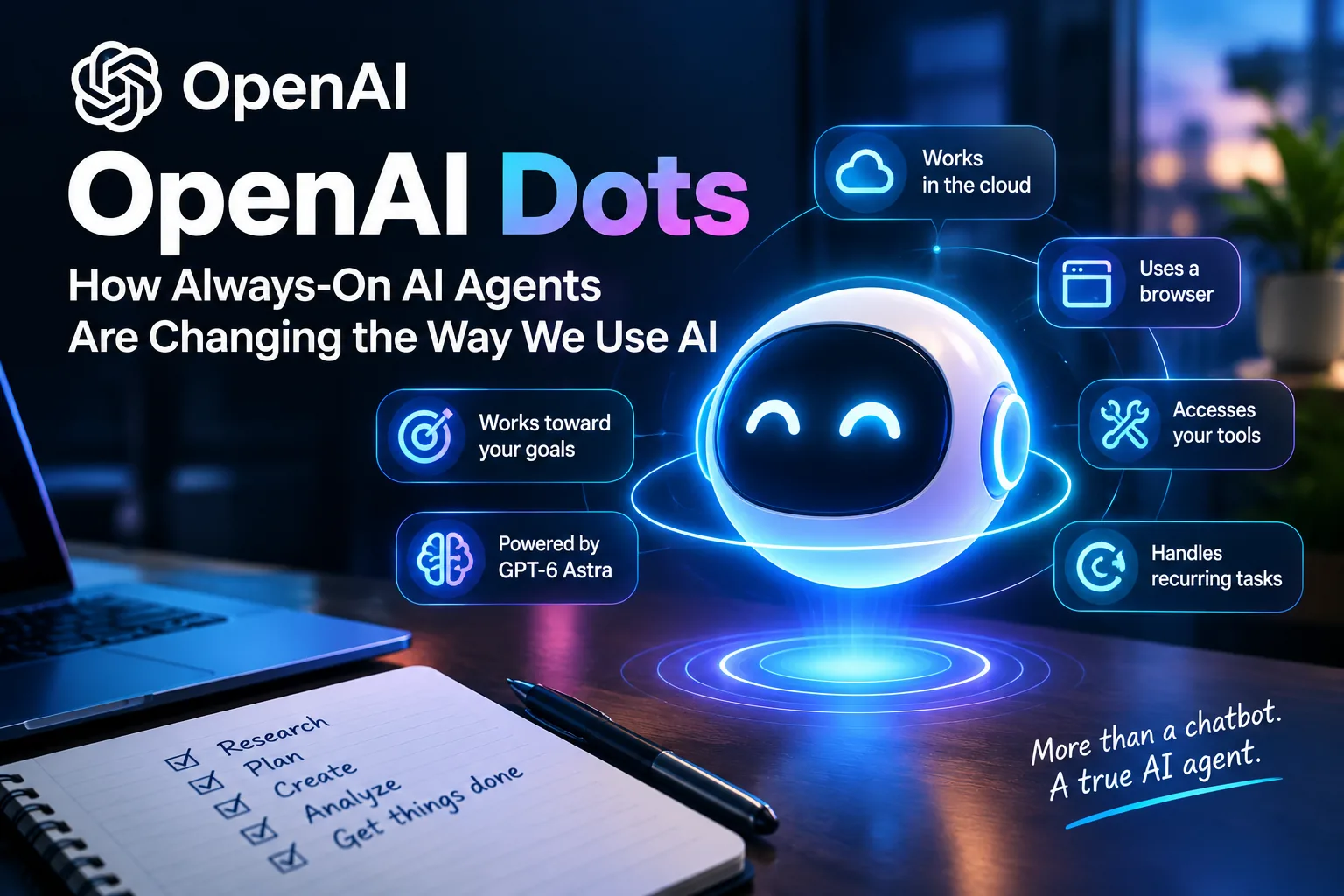
OpenAI Dots are always-on AI agents designed to take responsibility for ongoing tasks and continue making progress between conversations. OpenAI announced Dots at DevDay 2026, describing them as agents powered by GPT-6 Astra that can use a dedicated cloud computer, browser, connected tools and user-provided context.
Unlike a conventional chatbot that generally waits for you to send another message, a Dot is designed around a goal rather than a series of individual questions.
That changes the prompting model from:
Ask → Answer → Ask again
to something closer to:
Define a goal → Set boundaries → Let the agent work → Review the result
This shift is important for anyone learning AI prompting because prompting increasingly involves defining objectives, constraints, context and permissions—not simply writing a clever question.
What Did OpenAI Announce About Dots?
OpenAI introduced Dots during DevDay 2026 on September 29, 2026, alongside more than 20 announcements involving models, ChatGPT, Codex, APIs and new ways for people and AI agents to work together.
OpenAI describes Dots as “always-on agents” designed to handle ongoing responsibilities.
The company says each Dot has:
- Its own cloud computer
- A browser
- Access to connected tools and applications
- Persistent context for ongoing work
- The ability to work toward user-defined goals
- Support for recurring work
- The ability to follow up across multiple communication channels
- The ability to delegate some work to subagents
OpenAI’s GPT-6 Astra safety documentation also specifically includes an evaluation section for Dots, covering the risks associated with proactive, long-running agent work.
Why “Always-On” Matters
The important part isn’t simply that Dots can answer questions.
It’s that the agent is intended to continue working after the initial interaction.
For example, instead of repeatedly asking an AI:
“Research this topic.”
You could potentially define a broader responsibility such as:
“Monitor this topic, organize relevant developments, and bring important findings to my attention.”
The second approach requires the AI to manage more of the workflow itself.
That’s one reason agentic AI is becoming an important development beyond conventional chatbot prompting.
How Are OpenAI Dots Different From ChatGPT?
ChatGPT is primarily an interactive AI assistant: you communicate with it, give it instructions, and receive responses.
Dots are designed around ongoing responsibility.
OpenAI’s own help documentation says a Dot can keep making progress between conversations and work through complex problems while returning to the user for decisions that require their judgment.
| Feature | Traditional AI Chat | OpenAI Dots |
|---|---|---|
| Interaction | Usually prompt and response | Ongoing responsibility |
| Main focus | Individual requests | Longer-running goals |
| Context | Conversation context | Persistent context for ongoing work |
| Computer access | Depends on the feature | Dedicated cloud computer |
| Browser | Feature-dependent | Included in the agent design |
| Recurring work | Usually requires additional instructions | Designed to handle recurring responsibilities |
| Human involvement | Often frequent | Agent can continue between interactions |
| Sensitive actions | User-controlled | Designed to seek confirmation for important actions |
The key distinction is therefore persistence and initiative, rather than simply intelligence.
What Can OpenAI Dots Do?
OpenAI’s announcement positions Dots as general-purpose agents capable of handling different kinds of ongoing work.
Potential applications include:
Research
A Dot could work on an ongoing research assignment, gather information and organize findings for review.
This is particularly relevant to AI research prompting because the prompt needs to define more than a single question.
A useful agent instruction could specify:
- The research objective
- What sources to consider
- What information matters
- What should be ignored
- How findings should be organized
- When the agent should ask for approval
That is much closer to designing a workflow than writing a one-line prompt.
Data Analysis
Longer-running analytical tasks are another potential use.
Instead of asking an AI to analyze one dataset and stop, an agent can potentially work through multiple stages of a larger assignment.
For example:
Collect → Analyze → Identify patterns → Organize findings → Report
The human still needs to determine whether the methodology and conclusions are appropriate.
Coding and Software Work
Dots are also connected to OpenAI’s broader agent and coding ecosystem.
OpenAI says its DevDay announcements include new capabilities across Codex and its API, reflecting the company’s broader push toward AI systems that can undertake longer-running technical work.
This makes prompt engineering increasingly relevant to developers because an agent needs clear specifications, constraints and success criteria.
Managing Information
Another potential use is keeping track of information across connected applications.
OpenAI says Dots can work across ChatGPT and connected tools, while its help documentation describes Dots as working across apps the user chooses to connect.
That creates an important difference between asking AI a question and giving AI responsibility for a process.
How Do You Prompt an AI Agent Like a Dot?
This is where agentic AI changes the fundamentals of prompting.
A normal prompt might say:
“Summarize these five articles.”
An agent-oriented prompt can be much more structured:
Goal: Monitor developments in artificial intelligence.
Task: Identify significant developments and organize them by topic.
Sources: Use reliable primary and reputable secondary sources.
Constraints: Don’t report unverified claims as facts.
Output: Provide a concise summary with source links.
Escalation: Ask for approval before taking external actions.
Notice the difference.
The second prompt doesn’t simply request an answer. It defines a job.
For a deeper explanation of the components behind effective instructions, see Promptenza’s Prompt Anatomy guide.
The New Prompting Skill: Give AI a Goal, Not Just a Question
Traditional prompting often focuses on improving the wording of a request.
Agentic prompting requires a broader approach.
You need to think about:
1. The Objective
What should the AI ultimately accomplish?
2. Context
What information does the agent need?
3. Constraints
What must it avoid?
4. Tools
Which applications, files or information sources can it use?
5. Decision Boundaries
What can it decide independently?
6. Approval Points
When must it stop and ask you?
7. Success Criteria
How will you know the task was completed correctly?
These concepts overlap directly with the core components explained in Promptenza’s Prompt Anatomy and Prompt Engineering guide.
OpenAI Dots and Human Oversight
The “always-on” concept also introduces an important question:
How much independence should an AI agent have?
OpenAI’s safety documentation says its testing of Dots included attempts to manipulate agents, extract sensitive information and induce unwanted actions. OpenAI reports that its red-team testing found Dots resistant to several tested attacks, while also identifying opportunities to strengthen sensitive-data handling and confirmation behavior.
OpenAI says updates to confirmation policies addressed the issues identified in the tested scenarios, while noting that it continues to test and address vulnerabilities.
That distinction matters.
An AI agent that only answers questions has a limited ability to affect the outside world.
An AI agent that can access applications, browse information and perform tasks has a much larger action surface.
The more capable the agent becomes, the more important clear permissions and human review become.
What Happens When AI Can Work While You’re Away?
This may be the biggest conceptual change introduced by Dots.
With conventional chat, the workflow looks like this:
You → Prompt → AI → Answer → You
With an always-on agent, it can look more like:
You → Goal → AI Agent → Research → Actions → Progress → Review
That means the user’s role changes.
Instead of constantly producing individual prompts, the user increasingly becomes the person who:
- Defines the objective
- Provides context
- Establishes boundaries
- Reviews important decisions
- Evaluates the output
- Corrects the agent when necessary
This is one reason AI literacy is becoming broader than simply knowing how to use a chatbot.
OpenAI Dots vs Traditional Chatbots
The difference can be summarized simply:
| Traditional chatbot | Always-on agent |
|---|---|
| Responds to requests | Works toward goals |
| Usually waits for input | Can continue working |
| Shorter interactions | Longer-running workflows |
| Produces answers | Can coordinate tasks |
| Prompt-focused | Goal-and-workflow-focused |
| Limited persistence | Designed for ongoing context |
| Human initiates most interactions | Agent can proactively follow up |
Neither approach eliminates the need for human judgment.
Instead, the agent model moves more responsibility from answer generation toward task execution.
Who Can Use OpenAI Dots?
OpenAI’s current help documentation says Dots are rolling out to ChatGPT Pro and Business Premium users in eligible markets, with Enterprise users—including Edu and Healthcare—able to try the beta when their workspace administrator enables it.
OpenAI also says the first Dot is included with eligible Pro or Business Premium plans at no additional cost, subject to the plan’s usage allowances.
Availability is still being rolled out, so access can vary by account and market.
What OpenAI Dots Could Mean for Prompt Engineering
Dots don’t make prompting obsolete.
They arguably make good prompting more important.
When an AI is only answering a single question, an unclear instruction might produce a mediocre answer.
When an AI is working on a task for a longer period, unclear instructions can affect an entire workflow.
That’s why future prompting increasingly needs to cover:
Goal + Context + Instructions + Constraints + Tools + Permissions + Success Criteria
This is closely related to the principles covered in Promptenza’s AI Prompt Structure guide.
For practical examples, readers can also explore the Prompt Library.
Are Always-On AI Agents the Future of AI?
Dots are part of a broader industry movement toward agentic AI—systems designed to do more than generate responses.
OpenAI’s DevDay announcement explicitly frames its new tools around ongoing responsibilities and new ways for people and AI to work together.
Other companies are pursuing similar ideas, which means the competition is increasingly shifting from:
“Which chatbot gives the best answer?”
toward:
“Which AI system can reliably accomplish useful work?”
That is a significant change in how people may interact with AI.
But the technology is still developing. Reliability, security, permissions, cost and human oversight remain important considerations.
What Dots Mean for Everyday AI Users
You don’t need access to an always-on agent to start learning the skills behind this shift.
You can already improve your AI workflows by learning to:
- Define the goal before writing the prompt.
- Give the AI relevant context.
- Specify the desired output.
- Establish constraints.
- Provide examples when useful.
- Define what success looks like.
- Ask AI to identify uncertainty rather than invent information.
- Review important results before acting on them.
These are foundational AI prompting techniques that remain useful across different AI systems.
The Bigger Shift: From Prompting AI to Managing AI
OpenAI Dots represents a broader change in the relationship between people and AI.
The early chatbot model was:
Ask AI → Receive answer
The emerging agent model is:
Define objective → AI works → Human reviews
That doesn’t mean people disappear from the workflow.
Instead, humans may spend less time manually directing every individual step and more time defining objectives, setting boundaries and evaluating outcomes.
For Promptenza readers, that makes prompt structure, AI literacy and workflow design increasingly important.
Frequently Asked Questions About OpenAI Dots
What are OpenAI Dots?
OpenAI Dots are always-on AI agents designed to take responsibility for ongoing tasks and continue making progress between conversations. They are powered by GPT-6 Astra and use their own cloud computer and browser.
Are OpenAI Dots the same as ChatGPT?
No. Dots are designed for ongoing agentic work rather than primarily responding to individual conversational requests. OpenAI describes them as agents that can continue working toward goals between conversations.
What model powers OpenAI Dots?
OpenAI says Dots are powered by GPT-6 Astra.
Can OpenAI Dots work autonomously?
Dots are designed to work proactively toward user-defined goals, but OpenAI’s documentation also describes situations in which the agent turns to the user for decisions requiring human judgment.
Do OpenAI Dots have access to a computer?
Yes. OpenAI says each Dot has its own cloud computer and browser.
Can Dots take sensitive actions without asking?
OpenAI says its systems include confirmation safeguards for sensitive actions, and its safety evaluation discusses strengthening confirmation behavior based on testing.
Who can use OpenAI Dots?
OpenAI’s current documentation says Dots are rolling out to Pro and Business Premium users in eligible markets, while Enterprise users—including Edu and Healthcare—can access a beta when enabled by their workspace administrator.
Why are OpenAI Dots important for prompt engineering?
Because an agent needs more than a question. Effective agent instructions need to define goals, context, constraints, permissions and desired outcomes. This makes structured prompting increasingly important.
Test Your AI Agent Prompting Knowledge
1. What makes an AI agent different from a traditional chatbot?
A. It always gives longer answers
B. It can work toward ongoing goals
C. It doesn’t need instructions
D. It never requires human oversight
Answer: B.
AI agents are designed to perform multi-step or ongoing work toward defined objectives.
2. What should you define first when creating an agent instruction?
A. The font
B. The objective
C. The AI’s personality
D. The response length
Answer: B.
A clear objective gives the agent a defined target.
3. Why are constraints important?
A. They make prompts longer
B. They prevent the AI from using language
C. They define boundaries for the task
D. They make AI autonomous
Answer: C.
4. Why are approval points useful?
A. They allow humans to review important decisions
B. They make AI faster
C. They remove the need for prompts
D. They guarantee perfect results
Answer: A.
5. What is the biggest prompting shift introduced by agentic AI?
A. From text to emojis
B. From questions to goals and workflows
C. From long prompts to short prompts
D. From AI to search engines
Answer: B.
Final Takeaway
OpenAI Dots moves AI interaction another step beyond the traditional chatbot.
Instead of simply waiting for the next question, Dots are designed to take on ongoing responsibilities, use tools, maintain context and continue working toward user-defined goals. OpenAI says the agents are powered by GPT-6 Astra and supported by dedicated cloud computing and safety controls.
For everyday AI users, the important lesson isn’t simply how to use Dots.
It’s how to design better instructions for AI systems that can actually do work.
That means learning to define objectives, context, constraints, permissions and success criteria clearly.
Start with Promptenza’s Prompt Anatomy, continue with Prompt Engineering, and then practice with the Prompt Library.
Last Updated: 30 September, 2026