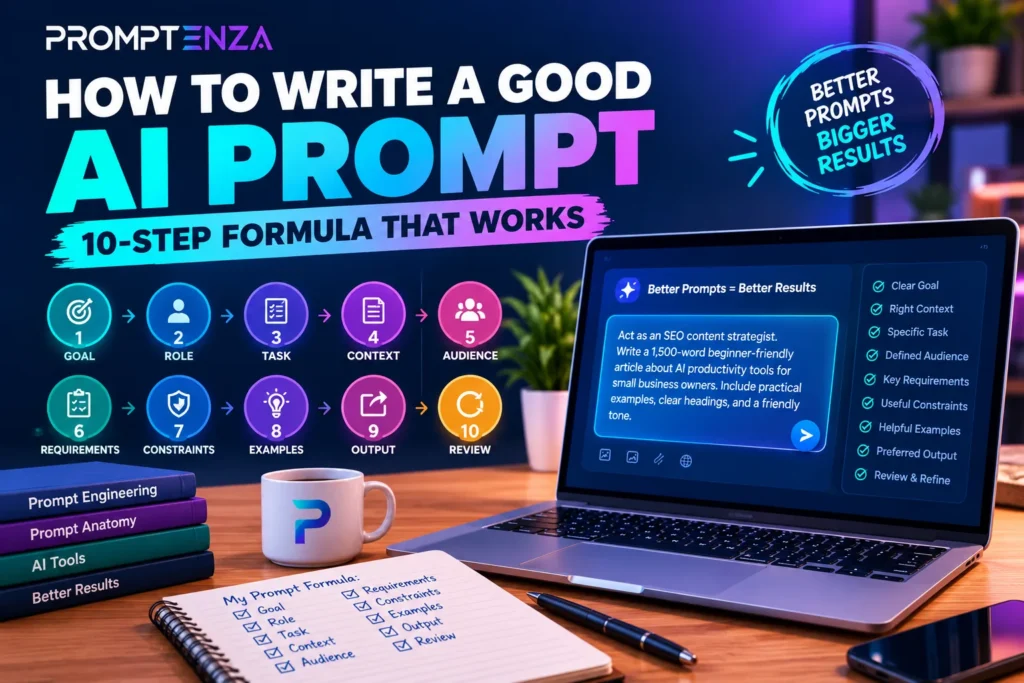
AI prompt structure is the way you organize a prompt so an AI model clearly understands what you want it to do, what information it should use, and what the final response should look like.
A practical structure for complex prompts is:
TASK → CONTEXT → INSTRUCTIONS → CONSTRAINTS → EXAMPLES → INPUT → OUTPUT FORMAT
You don’t need all seven parts for every prompt. A simple request may need only a task and input, while a complex writing, research, coding, or analysis task can benefit from several components.
Quick Answer: To structure an effective AI prompt, start with a clear task, add relevant context, explain important instructions, set useful constraints, provide examples when they clarify a pattern, separate the input from your instructions, and specify the desired output format. Then test the response and refine the part that caused the problem.
The goal isn’t to make your prompt as long as possible.
The goal is to give the AI the right information in a clear structure so it can produce the result you actually need.
If you’re completely new to prompting, start with our Prompting for Beginners guide →.
Related: Prompt Anatomy: The Essential Parts of an Effective AI Prompt
What Is AI Prompt Structure? Definition & Example
AI prompt structure is the way you organize instructions, information, requirements, and desired output in a prompt so an AI model can understand the task and produce a useful response.
Consider this vague prompt:
Write an article about AI.
The AI knows the general topic, but it doesn’t know:
- Who the article is for
- What the article should accomplish
- What information to include
- How detailed it should be
- What tone to use
- How the information should be organized
A structured version gives the AI more useful direction:
Write a beginner-friendly 1,500-word article explaining AI prompting to small-business owners. Use simple language, explain five common prompting mistakes, provide an example for each, and finish with a practical checklist. Use descriptive H2 and H3 headings and keep paragraphs short.
The second prompt gives the AI a clearer objective, relevant context, requirements, and expected structure.
Prompt Structure vs. Prompt Anatomy
Prompt anatomy and prompt structure are closely related, but they answer different questions.
Prompt anatomy asks:
What components can a prompt contain?
Prompt structure asks:
How should I organize and use those components for this particular task?
A simple way to remember the difference:
Prompt Anatomy = the building blocks
Prompt Structure = how you arrange and use the building blocks
Our Prompt Anatomy guide goes deeper into individual components such as roles, tasks, context, instructions, constraints, examples, input, output format, tone, and success criteria.
A prompt can contain many useful components and still be poorly structured if the instructions are unclear, information is mixed together, or requirements conflict.
The 7 Parts of an AI Prompt
Promptenza uses the following seven-part framework for organizing complex AI prompts:
- Task — what the AI should do
- Context — what background the AI needs
- Instructions — how the AI should approach the task
- Constraints — what limits or requirements apply
- Examples — what the desired pattern looks like
- Input — the information the AI should process
- Output Format — what the final result should look like
A useful way to remember them is:
WHAT → BACKGROUND → HOW → LIMITS → PATTERN → DATA → RESULT
AI Prompt Structure at a Glance
| Part | Main Question | Example |
|---|---|---|
| Task | What should AI do? | “Summarize this report.” |
| Context | What does AI need to know? | “The audience is beginners.” |
| Instructions | How should it approach the task? | “Focus on the three main findings.” |
| Constraints | What limits apply? | “Use no more than five bullet points.” |
| Examples | What should the pattern look like? | “Follow this example.” |
| Input | What should AI process? | “Analyze the text below.” |
| Output Format | What should the result look like? | “Return a comparison table.” |
Is This a Universal Seven-Part Formula?
No.
There is no single structure that every AI prompt must contain.
This is a practical Promptenza framework for organizing complex prompts. Other prompting frameworks may include additional components such as role, tone, success criteria, or evaluation requirements. Some combine components, while others leave certain parts out.
The important principle is not to force every prompt into seven sections.
Use the components that remove ambiguity and help the AI complete the specific task.
1. Task: Tell the AI What to Do
The task is the main action you want the AI to perform.
It answers:
What should the AI do?
Common task verbs include:
- Explain
- Summarize
- Compare
- Analyze
- Rewrite
- Generate
- Classify
- Translate
- Extract
- Organize
- Brainstorm
- Evaluate
Weak Task
Marketing.
This identifies a topic but doesn’t give the AI a clear job.
Better Task
Generate marketing ideas for a small online clothing business.
More Specific Task
Generate 15 low-cost marketing ideas for a small online clothing business targeting university students.
The more clearly you define the action, the less the AI has to infer.
2. Context: Give the AI Relevant Background
Context provides information that helps the AI understand the situation surrounding the task.
It can include:
- Audience
- Purpose
- Industry
- Location
- Background information
- Existing material
- User preferences
- Technical environment
- Previous decisions
- Project requirements
For example:
We sell project-management software to small businesses. Our audience consists of business owners who currently manage projects using spreadsheets.
This context can influence the recommendations, examples, vocabulary, and level of detail the AI provides.
More Context Is Not Always Better
Ask:
Does this information change what the AI should produce?
If it does, include it.
If it doesn’t, it may be unnecessary.
This principle is particularly important in larger AI workflows, where managing the information available to a model can be just as important as writing the initial prompt.
For more guidance, see Context in AI Prompts.
3. Instructions: Explain How the AI Should Approach the Task
Instructions tell the AI how you want the task performed.
They can define:
- Approach
- Priorities
- Tone
- Perspective
- Steps
- Information to emphasize
- Things to avoid
- Level of detail
For example:
Explain the topic for someone who has never used an AI chatbot. Start with a simple explanation, then provide three practical examples.
The task tells the AI what to do.
The instructions tell it how to approach the job.
Example
Task:
Write a product description.
Instructions:
Focus on practical benefits, use simple language, avoid exaggerated claims, and write for first-time buyers.
Specific instructions generally work better than vague requests such as:
Make it good.
4. Constraints: Set Meaningful Boundaries
Constraints tell the AI what limits or requirements it must follow.
They can include:
- Word count
- Number of results
- Required sections
- Reading level
- Tone
- Formatting
- Information boundaries
- Topics to avoid
- Technical requirements
For example:
Write a 500-word explanation for beginners. Use short paragraphs, no more than five bullet points, and avoid unnecessary technical terminology.
Constraints can make the expected result more predictable.
However, don’t add constraints simply to make a prompt look advanced.
If you only need a short answer, a word or bullet limit may be useful. If the task doesn’t require a particular length, adding an arbitrary limit may make the response less useful.
Good constraints solve a real problem.
5. Examples: Show the AI the Desired Pattern
Examples can be useful when the desired output is difficult to explain with instructions alone.
For example:
Convert customer comments into short summaries.
Example:
Customer comment: “The software is easy to use, but the reporting tools are limited.”
Summary: Easy to use; reporting features need improvement.
Now summarize the following comments using the same format.
The example demonstrates the expected pattern.
Examples can help with:
- Writing style
- Classification
- Formatting
- Tone
- Response structure
- Transformations
- Level of detail
You don’t need examples for every prompt.
When examples are used to demonstrate a pattern, the approach is commonly called few-shot prompting. Learn more in our Few-Shot Prompting guide.
Use Representative Examples
A useful example should demonstrate the behavior you actually want.
Avoid filling a prompt with unnecessary examples or examples that contradict your instructions.
One clear example can sometimes be more useful than several inconsistent ones.
6. Input: Give the AI the Material to Process
Input is the information the AI is expected to analyze, transform, summarize, classify, or use.
Input can include:
- Articles
- Customer reviews
- Emails
- Code
- Research notes
- Meeting transcripts
- Product information
- Spreadsheets
- Images
- Questions
- Documents
- Data
- Survey responses
For example:
Summarize the following customer feedback into three main complaints:
BEGIN CUSTOMER FEEDBACK
[Paste customer feedback here]
END CUSTOMER FEEDBACK
The customer feedback is the input.
Separate Instructions From Input
A structured prompt might look like:
TASK:
Identify the three main arguments.INPUT:
[Insert article]OUTPUT:
Return three bullet points.
This makes it easier to distinguish between:
What the AI should do
and
What the AI should analyze.
For longer source material, clear delimiters such as ###, ---, or XML-style tags can help separate instructions from reference material.
7. Output Format: Define What the Result Should Look Like
Output format specifies how the AI should present the final response.
Common formats include:
- Bullet points
- Numbered lists
- Tables
- Checklists
- Reports
- Emails
- Outlines
- Markdown
- JSON
- CSV
- Step-by-step instructions
- Headings and subheadings
Instead of:
Compare these AI tools.
Try:
Compare these five AI tools in a table with columns for tool name, primary use, key features, limitations, and best use case.
The second prompt tells the AI how the information should be organized.
Match the Output to Your Next Step
If you’re creating a report, request a report structure.
If you’re comparing options, request a table.
If you’re following a process, request numbered steps.
If you’re importing information into software, a structured format such as CSV or JSON may be appropriate.
The best output format is the one that reduces the work you have to do after receiving the AI’s response.
Do You Need All 7 Parts?
No.
This is one of the most important principles of AI prompt structure.
A good prompt is not necessarily a long prompt.
Simple Translation
Translate “Good morning” into Spanish.
That’s enough.
Simple Calculation
Calculate 15% of 240.
Again, additional structure adds little value.
Simple Definition
What is machine learning?
A short prompt is perfectly appropriate.
Complex Analysis
Now consider:
Analyze this business proposal, identify its target market, evaluate the main risks, compare three alternatives, and present the findings in a table.
This task has multiple objectives and benefits from more structure.
The Practical Rule
Use the simplest prompt structure that gives the AI enough information to complete the task.
A sophisticated-looking prompt is not automatically a better prompt.
Relevant detail matters more than maximum length.
Complete AI Prompt Structure Example
Now let’s combine the seven components.
Weak Prompt
Write an article about AI.
This communicates a topic but leaves many important decisions to the AI.
Structured Prompt
TASK: Write a beginner-friendly article explaining how AI prompt structure works.
CONTEXT: The audience consists of people who have used AI chatbots but have little knowledge of prompt engineering.
INSTRUCTIONS: Explain the major components of a structured prompt using simple language. Give practical examples and explain why each component matters.
CONSTRAINTS: Keep the article between 1,200 and 1,500 words. Avoid unnecessary technical terminology.
EXAMPLES: Include one weak prompt and one improved version.
INPUT: Use the seven-part Promptenza framework: Task, Context, Instructions, Constraints, Examples, Input, and Output Format.
OUTPUT FORMAT: Use an introduction, descriptive H2 and H3 headings, examples, tables where useful, FAQs, and a short summary.
Why Does the Structured Prompt Work?
| Component | What It Adds |
|---|---|
| Task | Defines the job |
| Context | Defines the audience |
| Instructions | Defines the approach |
| Constraints | Controls requirements |
| Examples | Clarifies the desired pattern |
| Input | Identifies the source material |
| Output Format | Defines the final structure |
The result isn’t necessarily better simply because the prompt is longer.
It is better structured because important decisions have been made explicit.
The AI Prompt Structure Formula
For a complex task, you can think of the framework as:
TASK → CONTEXT → INSTRUCTIONS → CONSTRAINTS → EXAMPLES → INPUT → OUTPUT
Each component answers a different question:
TASK → What should AI do?
CONTEXT → What does AI need to know?
INSTRUCTIONS → How should it approach the task?
CONSTRAINTS → What limits apply?
EXAMPLES → What should the desired pattern look like?
INPUT → What should AI work with?
OUTPUT → What should the final result look like?
Remember:
You don’t need every component. Use the parts that remove ambiguity for your specific task.
How to Structure an AI Prompt Step by Step
Use this process when creating a complex prompt from scratch.
Step 1: Define the Task
Start with the action.
Ask:
What exactly do I want the AI to do?
Instead of:
Marketing.
Try:
Generate 15 marketing ideas for a small online clothing business.
Step 2: Add Relevant Context
Give the AI background information that could change the answer.
The business sells affordable clothing to university students and has a limited marketing budget.
Step 3: Add Instructions
Explain how you want the AI to approach the task.
Prioritize practical ideas that can be implemented through social media.
Step 4: Add Constraints
Define meaningful boundaries such as:
- Word count
- Number of results
- Required sections
- Formatting
- Information limits
- Topics to avoid
Step 5: Add Examples When Useful
If the desired pattern is difficult to explain, demonstrate it.
Don’t add examples simply because you can.
Step 6: Add the Input
Clearly identify the material the AI should process.
For example:
INPUT: [Paste customer feedback here]
Step 7: Define the Output
Specify how the final answer should be presented.
For example:
Return the results in a table with columns for Campaign, Audience, Concept, and Example Post.
Step 8: Test the Prompt
Try the prompt with realistic input.
Don’t judge a reusable prompt from only one response.
For important workflows, test several representative cases and look for recurring problems.
Step 9: Refine the Weakest Component
If the answer is too vague, clarify the task or context.
If it’s too long, add a useful constraint.
If the format is wrong, improve the output instructions.
If the AI misunderstands the objective, rewrite the task.
A useful refinement cycle is:
Prompt → Response → Diagnose → Adjust → Test
For more techniques, explore AI Prompting Techniques.
Use Prompt Structure as a Debugging System
One of the most practical ways to use prompt structure is to treat it like a debugging system.
When an AI response is poor, don’t automatically rewrite the entire prompt.
First ask:
Which part of the prompt is most likely responsible for the problem?
| Problem | Component to Review |
|---|---|
| AI doesn’t understand the job | Task |
| AI lacks background | Context |
| AI takes the wrong approach | Instructions |
| Response is too broad | Constraints |
| AI misunderstands a pattern | Examples |
| AI works from the wrong material | Input |
| Response is difficult to use | Output Format |
Problem: The Answer Is Too Generic
Possible causes:
- Task is too broad
- Context is missing
- Audience isn’t defined
Try:
Explain this for first-time AI users and focus on three practical examples they can use immediately.
Problem: The Answer Is Too Long
Possible causes:
- No useful length boundary
- Output format is too open
Try:
Return the answer in five bullet points, with each point limited to two sentences.
Problem: The AI Uses the Wrong Format
The problem may be the output requirement.
Try:
Return the comparison as a six-column table with one row per tool.
Problem: The AI Includes Unsupported Information
Clarify the information boundary:
Use only the information provided below. If the information is insufficient, state what is missing rather than inventing an answer.
Problem: Important Information Is Missing
Create explicit requirements:
Make sure the final response covers A, B, C, and D.
Problem: The AI Misunderstands the Desired Style
Instead of:
Make it engaging.
Try:
Use short paragraphs, practical examples, direct language, and a conversational educational tone.
Specific characteristics are easier to follow than vague adjectives.
Copy-and-Use AI Prompt Structure Template
Use this template as a starting point for a complex prompt.
TASK:
[What do you want the AI to do?]

CONTEXT:
[What background information does the AI need?]

INSTRUCTIONS:
[How should the AI approach the task?]

CONSTRAINTS:
[What limits or requirements should it follow?]

EXAMPLES:
[Add an example if it clarifies the desired pattern.]

INPUT:
[Insert the material the AI should work with.]

OUTPUT FORMAT:
[Describe how you want the final response presented.]
How to Use the Template
You don’t need to fill every section.
Delete anything that isn’t relevant to the task.
For example, a simple request might only need:
TASK:
Summarize the article below.

INPUT:
[Paste article]

OUTPUT FORMAT:
Return five bullet points.
A more complex task might use all seven components.
The best template is the one that gives the AI enough information without adding unnecessary complexity.
AI Prompt Structure Examples for Different Tasks
The framework becomes easier to understand when applied to different types of work.
Writing Prompt Example
TASK: Write a beginner-friendly article about AI productivity.
CONTEXT: The audience consists of small-business owners who are new to generative AI.
INSTRUCTIONS: Explain practical ways AI can help with writing, research, planning, and repetitive tasks.
CONSTRAINTS: Avoid exaggerated claims. Use simple language.
EXAMPLES: Include examples involving emails, meeting notes, content planning, and research.
INPUT: Use the productivity notes provided below.
OUTPUT: Create a 1,200-word article with an introduction, H2 headings, bullet points, examples, and a conclusion.
For additional practical examples, explore AI Prompt Examples.
Research Prompt Example
TASK: Research the main factors influencing smartphone purchases among university students.
CONTEXT: Focus on students looking for affordable smartphones.
INSTRUCTIONS: Compare price, battery life, camera quality, performance, storage, and brand reputation.
CONSTRAINTS: Distinguish between established information and areas requiring further verification.
INPUT: Use the research material provided below.
OUTPUT: Present the findings in a table followed by a short summary of the main patterns.
For practical research workflows, see 100+ ChatGPT Prompts for Research.
Coding Prompt Example
TASK: Debug the following Python function.
CONTEXT: The function is intended to calculate the average of a list of numbers.
INSTRUCTIONS: Identify the problem, explain why it occurs, and provide a corrected version.
CONSTRAINTS: Do not rewrite unrelated parts of the code.
INPUT: [Insert Python code]
OUTPUT: Return the explanation first, followed by the corrected code.
For more practical programming workflows, see ChatGPT Coding.
Summarization Prompt Example
Summarize the article below in five bullet points. Preserve important numbers and conclusions, remove repetition, and do not introduce information that isn’t contained in the original article.
This prompt doesn’t need every component because the task is relatively straightforward.
Prompt Structure for ChatGPT, Gemini, and Claude
The same basic principles can be adapted across different AI systems.
A useful starting structure is:
Task + Context + Instructions + Constraints + Output Format
Add examples or input when they provide useful information.
Different AI models can respond differently to the same prompt, so important prompts should be tested in the environment where they will actually be used.
For practical ChatGPT workflows, explore our ChatGPT Prompts collection.
Prompt Structure vs. Prompt Engineering
Prompt structure is one part of the broader field of prompt engineering.
Prompt engineering can involve:
- Designing prompts
- Testing prompts
- Evaluating responses
- Refining instructions
- Comparing outputs
- Selecting useful examples
- Managing context
- Building multi-step workflows
- Applying prompting techniques
A practical workflow is:
Structure → Test → Evaluate → Refine → Repeat
A prompt can look excellent on paper and still produce an unsatisfactory response.
The response can reveal which part of the prompt needs improvement.
For the broader topic, read Prompt Engineering: Complete Guide to Writing Better AI Prompts.
Zero-Shot and Few-Shot Prompt Structure
Not every prompt needs examples.
Zero-Shot Prompting
A zero-shot prompt asks the AI to perform a task without providing examples of the desired output.
Classify this customer review as positive, negative, or neutral: “The phone looks great, but the battery doesn’t last long.”
The AI performs the task based on the instruction alone.
Learn more about Zero-Shot Prompting.
Few-Shot Prompting
A few-shot prompt provides examples before the new input.
“Excellent product.” → Positive
“The product arrived damaged.” → Negative
“The package arrived today.” → Neutral
Now classify: “The product works well but arrived late.”
The examples give the AI a pattern to follow.
Learn more in our Few-Shot Prompting guide.
When One Prompt Isn’t Enough: Prompt Chaining
Some tasks are too large or complicated to handle effectively in one interaction.
Instead of creating one enormous prompt, break the workflow into smaller stages.
For example:
Step 1: Define the Research Question
Identify the target audience and search intent.
Step 2: Build the Structure
Create an outline based on the audience and search intent.
Step 3: Create the Draft
Expand the outline into a draft.
Step 4: Review
Review the draft for repetition, unsupported claims, and missing information.
Step 5: Refine
Rewrite the draft based on the review.
This approach is called prompt chaining.
Learn more in our Prompt Chaining guide.
How to Improve an AI Prompt After the First Response
Your first prompt doesn’t have to be perfect.
In many real workflows, the first response is useful because it reveals what the prompt may be missing.
If the Answer Is Too Generic
Consider adding:
- More relevant context
- A specific audience
- A clearer objective
- Required details
If the Answer Is Too Long
Consider adding:
- A useful word limit
- A maximum number of points
- A more specific output format
If the Format Is Wrong
Specify the structure explicitly.
If the AI Makes Unsupported Claims
Try:
Use only the information provided and clearly identify anything that requires verification.
If the Response Misses Important Information
Add:
Make sure the final answer covers A, B, C, and D.
Use the refinement cycle:
Prompt → Response → Diagnose → Adjust → Test
For more practical ways to improve prompts, see How to Improve AI Prompts.
Common AI Prompt Structure Mistakes
Making Every Prompt Too Long
A long prompt isn’t automatically a good prompt.
Add detail when the task needs it.
Don’t add instructions simply to make a prompt appear advanced.
Leaving the Task Ambiguous
Instead of:
Make this better.
Try:
Rewrite this introduction to make the main benefit clearer and remove repetitive sentences.
The second version defines what “better” means.
Providing Irrelevant Context
More information can create noise.
Ask whether each piece of context actually changes the answer.
Forgetting the Output Format
If you need a table, checklist, list, JSON object, or specific document structure, say so.
Adding Conflicting Requirements
Avoid requirements that cannot realistically be satisfied together.
Using Examples That Contradict the Instructions
Examples teach the AI what you expect.
If examples and instructions conflict, the model may receive mixed signals.
Changing Everything at Once
When improving a reusable prompt, change one or two important variables at a time when possible.
This makes it easier to identify what actually improved the result.
How to Separate Instructions From Source Material
Long prompts often contain two very different things:
- Instructions for the AI
- Information the AI should process
Separating them makes the structure clearer.
For example:
TASK:
Identify the three main arguments in the article.CONTEXT:
The audience consists of beginners.INPUT:
—BEGIN ARTICLE—[Article text]
—END ARTICLE—
OUTPUT:
Return three numbered arguments with a one-sentence explanation for each.
This approach is useful for:
- Customer reviews
- Research documents
- Reports
- Meeting notes
- Long articles
- Source material
- Code
- Data
It also makes reusable prompts easier to maintain.
How to Define the Output Format
If an AI response will be used somewhere else, define that destination in the prompt.
For a Report
Create a formal report with an executive summary, findings, recommendations, and conclusion.
For a Comparison
Present the results in a table with one row per product.
For a Checklist
Return a numbered checklist that can be completed from top to bottom.
For Data
Return valid CSV with the columns name, category, price, and source.
For Structured Software Output
Return a valid JSON object containing title, summary, category, and tags.
The more important the formatting requirement, the more explicitly it should be stated.
AI Prompt Structure for Better AI-Assisted Content
Prompt structure can also help when creating content intended to answer real user questions.
A useful content-generation framework is:
Question → Context → Evidence/Input → Requirements → Output → Evaluation
For example:
QUESTION: What are the most important parts of an effective AI prompt?
CONTEXT: The article is for beginners learning AI prompting.
INPUT: Use the research notes provided below.
REQUIREMENTS: Explain each component clearly and include practical examples.
OUTPUT: Use descriptive H2 and H3 headings, short paragraphs, examples, and a summary table.
EVALUATION: Prioritize accuracy, clarity, usefulness, and completeness.
The principle is not to insert keywords mechanically.
The prompt should help produce content that directly answers the user’s question and provides useful information.
AI-assisted content should still be reviewed, fact-checked, edited, and improved with original information and practical examples.
For reusable starting points, explore AI Prompt Templates.
AI Prompt Structure Cheat Sheet
| Component | Main Question | Example |
|---|---|---|
| Task | What should AI do? | “Summarize this article.” |
| Context | What does AI need to know? | “The audience is beginners.” |
| Instructions | How should it do it? | “Focus on the three main arguments.” |
| Constraints | What limits apply? | “Use no more than 150 words.” |
| Examples | What should the pattern look like? | “Follow this example.” |
| Input | What should AI process? | “Analyze the text below.” |
| Output Format | What should the result look like? | “Return a five-row table.” |
The Short Version
TASK → CONTEXT → INSTRUCTIONS → CONSTRAINTS → EXAMPLES → INPUT → OUTPUT FORMAT
Save this framework as a quick reference, but remember that you don’t need every component for every prompt.
AI Prompt Quality Checklist
Before submitting a complex prompt, ask:
- Is the task clear?
- Have I provided relevant context?
- Are my instructions specific?
- Have I included important constraints?
- Would an example remove ambiguity?
- Did I provide the correct input?
- Did I specify the desired output format?
- Have I removed irrelevant information?
- Are any instructions contradictory?
- Can I evaluate whether the response succeeded?
You don’t need to answer yes to every question.
The purpose of the checklist is to identify the information that actually matters to the task.
Frequently Asked Questions About AI Prompt Structure
What is AI prompt structure?
AI prompt structure is the way instructions, context, input, constraints, examples, and output requirements are organized in a prompt to help an AI understand and complete a task.
What are the main parts of an AI prompt?
Promptenza uses a practical seven-part framework:
- Task
- Context
- Instructions
- Constraints
- Examples
- Input
- Output Format
Not every prompt needs all seven.
What is the best structure for an AI prompt?
There is no single structure that works for every prompt. For complex tasks, a useful starting framework is Task, Context, Instructions, Constraints, Examples, Input, and Output Format. Use only the components that help the AI understand and complete the task.
What should come first in an AI prompt?
Start with the main task or objective. Then provide relevant context, instructions, constraints, examples, input, and desired output format as needed.
What makes an AI prompt effective?
An effective prompt clearly communicates the task and provides the relevant information the AI needs to produce the desired result. Clear instructions, useful context, meaningful constraints, examples, and a defined output format can improve results for more complex tasks.
Does a longer AI prompt produce better results?
Not necessarily. A longer prompt can provide useful context, but unnecessary information can make a prompt harder to manage.
The goal is relevant detail, not maximum length.
Should I always include examples?
No. Examples are most useful when the desired pattern, style, classification, or format is difficult to explain with instructions alone.
What is the difference between prompt structure and prompt engineering?
Prompt structure focuses on organizing the components of a prompt.
Prompt engineering is broader and can include designing, testing, evaluating, refining, and combining prompts into larger workflows.
How do I improve a prompt that gives poor results?
First identify what is wrong with the response.
Then determine which prompt component may be responsible.
A vague answer may require more context, while an incorrectly formatted answer may require clearer output instructions.
Can the same prompt structure work with ChatGPT, Gemini, and Claude?
Yes. The general principles of clarity, context, instructions, constraints, examples, input, and output format can be adapted across different AI systems.
However, different models can respond differently to the same prompt, so important prompts should be tested in the environment where they will actually be used.
Test Your Prompting Knowledge
Test your understanding of AI prompt structure.
Question 1
Which component tells the AI what action to perform?
A. Context
B. Task
C. Input
D. Output Format
Answer: B — Task
The task defines the main action the AI should perform.
Question 2
Which component provides background information?
A. Context
B. Examples
C. Constraints
D. Output Format
Answer: A — Context
Context gives the AI information that helps it understand the situation.
Question 3
Which component establishes boundaries such as word count?
A. Task
B. Input
C. Constraints
D. Examples
Answer: C — Constraints
Constraints define limits and requirements.
Question 4
What is the main purpose of examples in a prompt?
A. Make every prompt longer
B. Demonstrate the desired pattern or result
C. Replace the task
D. Remove the need for input
Answer: B — Demonstrate the desired pattern or result
Examples can clarify style, formatting, classification, or other patterns.
Question 5
Which component identifies the information the AI should process?
A. Input
B. Context
C. Task
D. Constraints
Answer: A — Input
Input is the material the AI needs to work with.
Question 6
Which component specifies whether the answer should be a table or bullet list?
A. Context
B. Output Format
C. Task
D. Examples
Answer: B — Output Format
Output format tells the AI how the final result should be presented.
Question 7
Does every prompt require all seven components?
A. Yes
B. No
Answer: B — No
Simple tasks may require only a few components.
Question 8
What should you do when an AI response is too generic?
A. Always make the prompt longer
B. Add relevant context or clearer instructions
C. Remove the task
D. Delete the input
Answer: B — Add relevant context or clearer instructions
The best fix depends on why the response is generic.
Question 9
What is few-shot prompting?
A. Using no instructions
B. Providing examples to demonstrate a desired pattern
C. Using extremely short prompts
D. Asking unrelated questions
Answer: B — Providing examples to demonstrate a desired pattern
Few-shot prompting uses examples to help the AI understand the expected pattern.
Question 10
What is the main goal of good prompt structure?
A. Make prompts as long as possible
B. Use every available prompting technique
C. Give the AI the relevant information and instructions needed for the task
D. Add as many constraints as possible
Answer: C — Give the AI the relevant information and instructions needed for the task
Good prompt structure is about clarity and relevance, not maximum length.
Your Score
9–10 correct: Excellent — you understand the core principles of prompt structure.
7–8 correct: Good — you understand most of the framework. Review the component sections you missed.
5–6 correct: You’re on the right track. Revisit the seven parts and try the test again.
0–4 correct: Start with the seven-part framework and work through the examples before retaking the test.
Build Better AI Prompts With Promptenza
Good prompting isn’t about finding a magic sentence.
It’s about giving an AI the information it needs to understand the task and produce a useful result.
Start with the task, add relevant context, provide clear instructions, set meaningful constraints, use examples when helpful, provide the necessary input, and define the desired output format.
Then test the result.
If something goes wrong, don’t automatically make the prompt longer.
Diagnose the problem, identify the component that needs improvement, and refine that part.
Continue learning with these Promptenza resources:
- Prompt Anatomy: The Essential Parts of an Effective AI Prompt — understand the individual components of a prompt.
- Prompt Engineering: Complete Guide to Writing Better AI Prompts — learn how to design, test, evaluate, and refine prompts.
- AI Prompt Examples — see practical prompts for different tasks.
- AI Prompt Templates — start with reusable prompt structures.
- AI Prompting Techniques — explore techniques for improving AI responses.
- Prompt Library — browse practical prompts for real-world tasks.
- ChatGPT Prompts — explore prompts for work, writing, research, coding, productivity, and more.
Key Takeaway
A well-structured AI prompt gives the model the right information in the right form.
The Promptenza framework provides a practical way to think about complex prompts:
TASK → CONTEXT → INSTRUCTIONS → CONSTRAINTS → EXAMPLES → INPUT → OUTPUT FORMAT
You don’t need every component every time.
Use the parts that help remove ambiguity, test the result, and refine the weakest part when the output isn’t what you need.
The goal isn’t to write the longest prompt.
The goal is to create the clearest path from your intention to the result you want.